 |
dbosst
Apprentice
Joined: 15 Jun 2010
Posts: 121
|
 Posted: Fri Aug 27, 2010 8:32 pm Posted: Fri Aug 27, 2010 8:32 pm
3.22 code reformatting
|
For whatever reason I keep forgetting to make this post until today... looking from the features page I'm pretty sure its not working as expected, as is in http://www.zuggsoft.com/images/cmud_syntaxeditor.gif
example code
| Code: |
#if (%1 == "show") {#var killdisplay 0;slainshow} {#if (%1 == "search") {#var killdisplay 0;#var killmatch 0;slainsearch %-2} {#if (%-1 == "reset") {slainreset} {slainhelp}}}
|
Before reformat (all one line):

Formatted using CMud "Reformat Script":

What I think it should look like...
 |
|
|
|
|
Zugg
MASTER

Joined: 25 Sep 2000
Posts: 23379
Location: Colorado, USA
|
Posted: Fri Aug 27, 2010 9:25 pm
|
It's not actually a bug. The Format Script tries not to put stuff on new lines if it's already a one-line script. It is designed so that something like:
| Code: |
| #IF (%-1 == "reset") {slainreset} {slainhelp} |
remains on a single line.
Improving how this works and adding more options for it is on the to-do list for the future, but not for the next public version, sorry. |
|
|
|
|
dbosst
Apprentice
Joined: 15 Jun 2010
Posts: 121
|
Posted: Fri Aug 27, 2010 9:36 pm
|
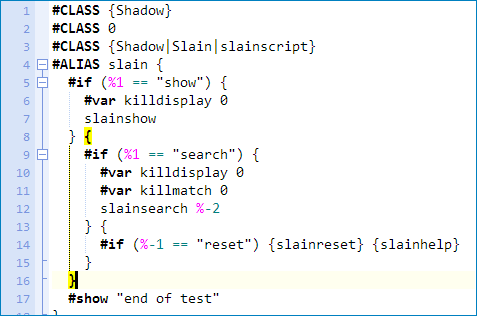
the problem I really have is with the formatting of the braces... it is not helpful at all in finding when a code block ends and a new one begins.. it automatically places the close brace for the THEN block indented and begins the ELSE code block on the same line.. also the close braces for all nested ELSE code blocks that are multiple lines should be in the same column as the original #if, not just placed at the end of the last line... I don't call this reformatting at all really, no offense
Also I understand having slainreset and slainhelp in the same line ... they are single line code blocks so I understand what you mean there...
I was referring more to the column where the braces line up
Look at your own example from your features page to see where the braces should be (http://www.zuggsoft.com/images/cmud_syntaxeditor.gif):
 |
|
|
|
|
Zugg
MASTER
Joined: 25 Sep 2000
Posts: 23379
Location: Colorado, USA
|
Posted: Fri Aug 27, 2010 9:56 pm
|
Yes, I understand exactly what you are saying, and yes it would be nice to improve this for the future. But unless the Script Formatter is creating a syntax error, I have no plans to update this at this time, sorry. The part of the parser that handles the script reformatting is very complex and this is not an easy fix.
| Quote: |
| I don't call this reformatting at all really, no offense |
That's your opinion, but it's still a *lot* better than the single-line version. |
|
|
|
|
|
|
|





