 |
chamenas
Wizard

Joined: 26 Mar 2008
Posts: 1547
|
 Posted: Wed Mar 26, 2008 9:02 pm Posted: Wed Mar 26, 2008 9:02 pm
This package is read only
|
I disconnected my session only to find half the stuff I did wasn't saved...
it says: This Package is marked as Read-Only. Changes will not be saved to *.pkg file
How do I shut that off so my settings can be saved? |
|
|
|
|
alluran
Adept
Joined: 14 Sep 2005
Posts: 223
Location: Sydney, Australia
|
Posted: Wed Mar 26, 2008 10:10 pm
|
Edit->Package Properties
then click the read only link
Unfortunately this is a known bug, and it may revert to read only on startup in future |
|
_________________
The Drake Forestseer |
 |
|
|
Anaristos
Sorcerer
Joined: 17 Jul 2007
Posts: 821
Location: California
|
Posted: Thu Mar 27, 2008 12:02 am
|
If you are using #CLOSE <windowname> in your scripts, this will cause the package to become read-only. So after you close a window, follow the procedure outlined by Alluran.
|
|
_________________
Sic itur ad astra. |
|
|
|
chamenas
Wizard
Joined: 26 Mar 2008
Posts: 1547
|
Posted: Thu Mar 27, 2008 9:37 am
|
This is more than annoying. Now if I close out, my onconnect wont work, I type void, which is an alias of mine and it merely says "huh?", which means it's sending it to the MUD, so all of my settings are whack.
|
|
|
|
|
chamenas
Wizard
Joined: 26 Mar 2008
Posts: 1547
|
Posted: Thu Mar 27, 2008 9:41 am
|
Now none of my aliases work...
|
|
|
|
|
chamenas
Wizard
Joined: 26 Mar 2008
Posts: 1547
|
Posted: Thu Mar 27, 2008 9:43 am
|
Tried creating a new alias, it doesn't work either. Also, no matter what my default settings are, it refuses to save and reload my layout.
|
|
|
|
|
chamenas
Wizard
Joined: 26 Mar 2008
Posts: 1547
|
Posted: Thu Mar 27, 2008 9:48 am
|
Actually, none of the # are working...
|
|
|
|
|
Fang Xianfu
GURU

Joined: 26 Jan 2004
Posts: 5155
Location: United Kingdom
|
Posted: Thu Mar 27, 2008 9:56 am
|
In future, edit your previous post rather than posting again if it's only been a couple of minutes since you last posted.
Check the computer icon in the bottom right corner - if it has a cross through it, parsing's off. Click it so that the cross disappears, leaving just the computer icon. |
|
|
|
|
chamenas
Wizard
Joined: 26 Mar 2008
Posts: 1547
|
Posted: Thu Mar 27, 2008 10:00 am
|
| Fang Xianfu wrote: |
In future, edit your previous post rather than posting again if it's only been a couple of minutes since you last posted.
Check the computer icon in the bottom right corner - if it has a cross through it, parsing's off. Click it so that the cross disappears, leaving just the computer icon. |
There's nothing I can do about the fact that it screws up and go read file only on me every time? Cause that's what's causing this.
I have:
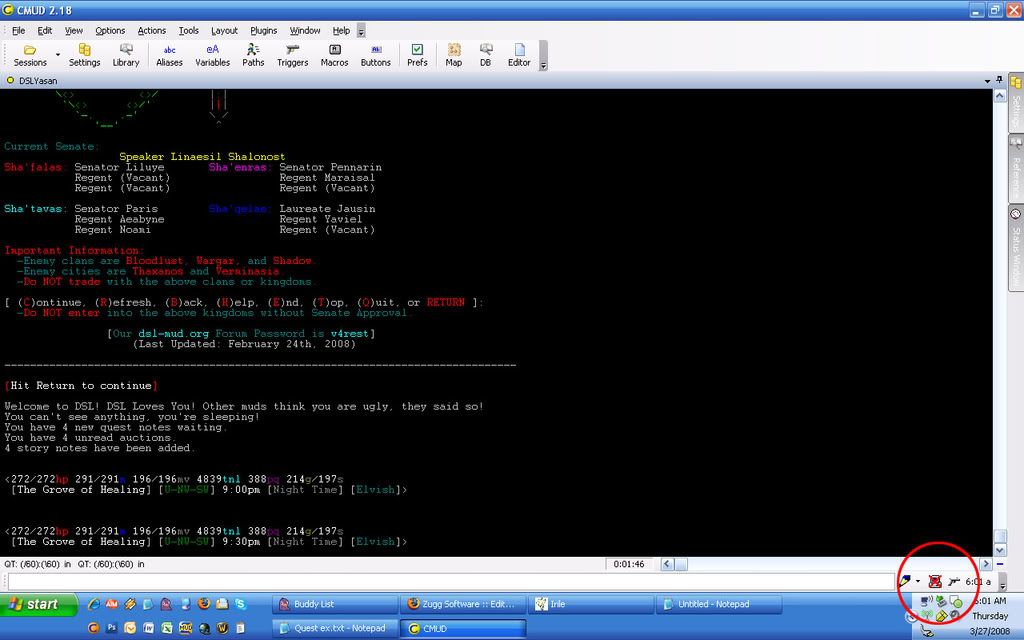
I click on it and nothing happens.
And, as of right now, I still have to reset it each time, which means my onconnect script isn't doing anything.  |
|
|
|
|
Zugg
MASTER

Joined: 25 Sep 2000
Posts: 23379
Location: Colorado, USA
|
Posted: Thu Mar 27, 2008 5:22 pm
|
This bug is already fixed in the 2.2x Beta version, but since you are a new user, I don't really recommend that you use that yet.
In v2.18, just be sure you don't use the #CLOSE command to close any window, or don't close any window manually. Just get your windows (like capture windows, etc) set up the way you want them and then leave them that way and don't mess with them. Also, don't use the "Close Session" menu command in v2.18. Just quit the entire program with File/Quit or click the red X in the upper right corner to exit CMUD. That usually gets around the bug with the package getting set as read only.
But I've never seen a case where the ReadOnly bug was causing the Parse icon to get disabled like that. First of all, having the Parse icon disable isn't going to effect your "onconnect" event script. The Parse option only effects stuff you type into the command line. You can also use CTRL-R to toggle the Parse icon on and off. |
|
|
|
|
chamenas
Wizard
Joined: 26 Mar 2008
Posts: 1547
|
Posted: Thu Mar 27, 2008 5:24 pm
|
I close out with the X and I still have to disconnect every time I run the session and then reconnect to get everything to run properly.
|
|
|
|
|
alluran
Adept
Joined: 14 Sep 2005
Posts: 223
Location: Sydney, Australia
|
Posted: Thu Mar 27, 2008 9:16 pm
|
Is it possible you pressed control+r by accident? that toggles parsing on/off from command line
|
|
_________________
The Drake Forestseer |
|
|
|
chamenas
Wizard
Joined: 26 Mar 2008
Posts: 1547
|
Posted: Thu Mar 27, 2008 9:18 pm
|
Possibly. But it doesnt really explain all the other bugginess of it. But it's nothing anyone else is experiencing, I'm wondering if I ran into something that screwed up the install.
|
|
|
|
|
|
|
|




